---
description: "Firebird kits: versions, location, installation, verification and troubleshooting."
---
# Firebird kits
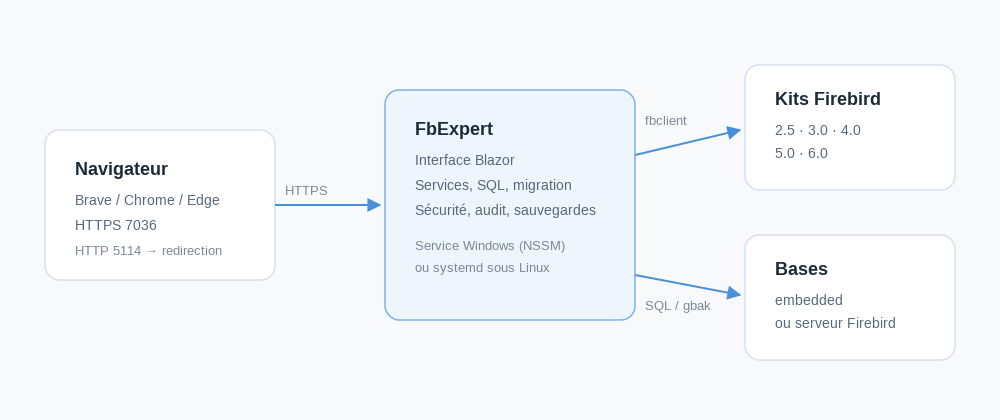
FbExpert ships its own engine for the system database and opens each user database with the kit that matches its version. A kit is a complete Firebird tree (`firebird.conf`, `plugins/`, `intl/`, `gbak`, `isql`, `gfix`…), flattened at the root of its folder.
The application selects the kit according to the ODS of the open database.
## Location
```text
/var/lib/fbexpert/engines//
```
The root comes from `Firebird:KitsRoot` in `/opt/fbexpert/appsettings.json`, written by the installer:
```json
"Firebird": {
"KitsRoot": "/var/lib/fbexpert/engines"
}
```
Since 7.382, **all** kit resolution uses this key: embedded connections, services, imports, UDR, transformations, backups.
## Versions
| Kit | ODS | Extracted size | Note |
|---|---|---|---|
| 2.5 | 10.x / 11.x | ~10 MB | end of life |
| 3.0 | 12.0 | ~24 MB | end of life |
| 4.0 | 13.0 | ~48 MB | useful to demonstrate a migration |
| 5.0 | 13.1 | ~70 MB | **mandatory** (system database and runtime) |
| 6.0 | 14.0 | ~111 MB | pre-release, `--allow-prerelease` |
A database can only be opened by the kit matching its ODS. "Firebird engine kit X not found" means the database is of that version and the kit is missing or cannot be read by `fbexpert`.
## Installation
Always go through the wrapper, as root; it runs the download **under the service account**:
```bash
sudo bash /opt/fbexpert/tools/install-kits-linux.sh -k 4.0
sudo bash /opt/fbexpert/tools/install-kits-linux.sh -k 2.5,3.0,4.0
sudo bash /opt/fbexpert/tools/install-kits-linux.sh -k 5.0 --force
sudo bash /opt/fbexpert/tools/install-kits-linux.sh -k 6.0 --allow-prerelease
```
`--force` replaces an existing kit, `--no-udf` skips FreeAdhocUDF. The main installer accepts the same list:
```bash
sudo bash /opt/fbexpert/tools/install-fbexpert-linux.sh \
--archive /root/FbExpert--linux-x64.7z \
--kits 2.5,3.0,4.0,5.0 --upgrade
```
::: warning Never run fetch-kits.sh as root
The files would be owned by root and the service would no longer be able to replace them. The wrapper takes care of this.
:::
The security database (`security5.fdb`, `security6.fdb`…) is initialized for **all** installed kits. Without it, a remote connection or a read of `SEC$USERS` returns `Install incomplete. To complete security database initialization please CREATE USER`.
## Verification
```bash
sudo -u fbexpert ls -1 /var/lib/fbexpert/engines
sudo -u fbexpert cat /var/lib/fbexpert/engines/4.0/kit.json
sudo -u fbexpert ls -l /var/lib/fbexpert/engines/4.0/libfbclient.so
```
Expected: one folder per version, `libfbclient.so` at the root (`libfbembed.so` for 2.5), `plugins/libEngine12.so` (3.0/4.0), `libEngine13.so` (5.0) or `libEngine14.so` (6.0), and a `kit.json` with version, tag, asset and checksum.
No restart is required: the kit is resolved when a database is opened or a service is started.
## Troubleshooting
| Symptom | Cause | Fix |
|---|---|---|
| `Permission non accordée` on `engines//…` | kit created by root | `chown -R fbexpert:fbexpert /var/lib/fbexpert/engines`, then run again with the wrapper |
| `No space left` / `fallocate failed` | disk or quota full | `df -h /var/lib/fbexpert` |
| `Aucun asset tar.gz Linux x64` | asset unavailable or API rate-limited | check the network, try again |
| database unreadable despite the kit | wrong version | `gstat -h db.fdb` (ODS), then install the matching kit |
| `gbak: libfbclient.so.2` not found | tool launched outside FbExpert | FbExpert 7.403+ sets `LD_LIBRARY_PATH`; manually: `LD_LIBRARY_PATH=/gbak …` |
| `Install incomplete…` | empty security database | `fetch-kits.sh --force` (7.408+) or `CREATE USER SYSDBA PASSWORD 'masterkey' USING PLUGIN Srp;` |
| `Unable to complete network request to host "localhost"` during analysis or in the workshop | child process without a kit (engine plugin not loaded) | 7.473+ passes `KitsRoot`, `FIREBIRD` and `LD_LIBRARY_PATH`; otherwise reinstall the kit (`fetch-kits.sh --force -k `) |
| same errors for every tool | `patchelf` missing at build time | `dnf install patchelf`, then `fetch-kits.sh --force` |
## Replacing a kit: ICU collations
A database records its Unicode collations with the ICU of the engine that created it. After replacing a kit, restoring a database from another machine or moving from 5.0 to 6.0, the first **write** fails with `COLLATION UNICODE …`. Realign it with the service stopped:
```bash
K=/var/lib/fbexpert/engines/5.0
DB=/var/lib/fbexpert/data/FBEXPERT.FB5
sudo systemctl stop fbexpert
sudo cp -a "$DB" /root/FBEXPERT.FB5.bak
sudo -u fbexpert env FIREBIRD="$K" LD_LIBRARY_PATH="$K" \
"$K/gfix" -icu "$DB" -user SYSDBA -password masterkey
sudo systemctl start fbexpert
```
For the **system database**, use the runtime actually loaded (`/var/lib/fbexpert/data/runtime/firebird/5.0`); for a user database, the kit matching its ODS.
Since 7.472, FbExpert performs this check **at startup**: a probe write (a Unicode table created then dropped) detects the mismatch before the first application write, then runs `gfix -icu` automatically with the runtime, after copying the database to `data/backups/system` as `FBEXPERT.collation-.fdb`. The log shows the ICU version recorded in the database. If the repair fails, the service starts in degraded mode with `FBX-START-203` and the command to run. Can be disabled with `Firebird:AutoRepairCollations=false`.
## Kits and demonstration
For a demo: keep **5.0** (mandatory) and optionally **4.0** to demonstrate a migration. Kits 2.5/3.0 are end-of-life engines; 6.0 is a pre-release. On a demonstration database, also lock the engine (`gfix -mode read_only`).