---
description: "FbExpert backups: gbak, NBackup, catalog, encryption and controlled restore."
---
# Backups
FbExpert centralizes local backups, their catalog, restores and exports.
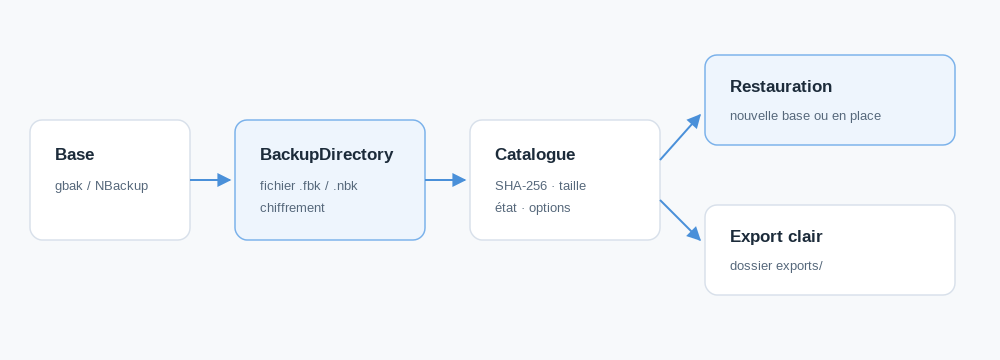
A backup is written under the authorized root, cataloged, then possibly restored.
## Principle
- all local backups are written under `Firebird:BackupDirectory`;
- the `FBEXPERT_BACKUPS` catalog keeps who, when, what, where, the size and the SHA-256;
- restores have their own history;
- exports are always in clear text and audited.
## Directory layout
```text
backups/
system/
FBEXPERT_20261123_030000.fbk
FBEXPERT.collation-20261124_195800.fdb
databases/
mabase__12/
mabase_20261123_030000.fbk
exports/
mabase_20261123_030000_plain.fbk
```
Temporary paths, `/home`, `/root` and private systemd directories are refused.
The `FBEXPERT.collation-.fdb` copy is written at startup, just before an automatic repair of Unicode collations (`gfix -icu`); it is not catalogued and can be deleted once the service has been checked.
## Backup
### Embedded database or local backup
The path is prefilled under:
```text
Firebird:BackupDirectory/databases/__/
```
The file is written by the local `gbak`, then encrypted if `Backup:Encrypt=true`. An `OK` entry is added to the catalog.
### Remote database
Without the `Run locally` option, `gbak` runs on the Firebird server and writes the file **on that server**. The local catalog is not updated; the audit records the operation.
An SFTP profile can download the file into `sftp-downloads`, then catalog it locally.
## Catalog
The catalog contains:
- source database;
- path;
- type `GBAK` or `NBACKUP`;
- scope `DATABASE` or `SYSTEM`;
- location `LOCAL` or `REMOTE`;
- file status;
- user;
- size and SHA-256;
- encryption;
- options;
- date and duration.
## Restore
An entry can be restored:
- to a new path;
- in place, by checking `Replace the existing database`.
::: danger
A restore in place overwrites the target database. Back up the target and check the path before confirming.
:::
## Configuration
```json
{
"Firebird": {
"BackupDirectory": "/var/lib/fbexpert/backups",
"BackupEnabled": true,
"BackupIntervalHours": 24,
"BackupKeep": 14,
"VerifyAfterBackup": true
},
"Backup": {
"Encrypt": true,
"KeepPerDatabase": 14,
"NotifyTo": ""
}
}
```
## Verification
After a backup:
1. check the `OK` status in the catalog;
2. check the size and the SHA-256;
3. test a restore on a staging database;
4. keep the backup off the production server.