
Import, export and ETL
FbExpert covers three different needs:
- export: produce a DDL script, data or a bundle;
- import: replay a script or load a dump;
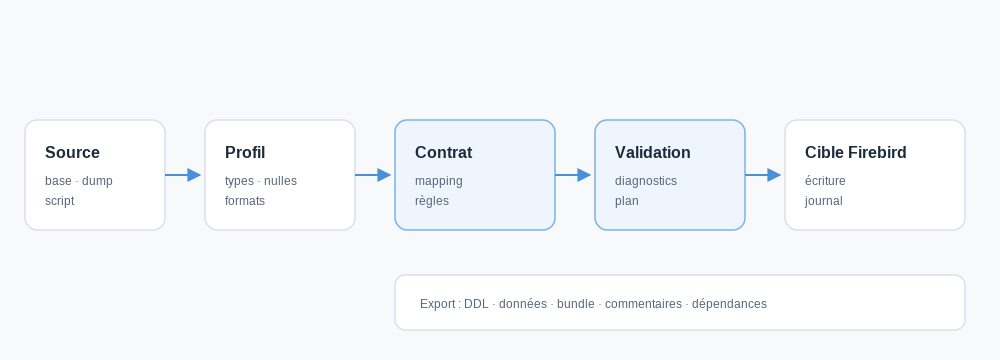
- ETL: analyze a source, define a contract, transform, then write to Firebird.
Export
An export can cover:
- a single object;
- a selection of objects;
- an entire database.
Possible content:
- DDL only;
- DDL + data;
- data only;
- comments;
- dependencies.
Useful options:
- include or exclude the data;
- keep the comments;
- normalize the charset;
- produce a re-importable bundle.
Import
Import accepts:
- a SQL script;
- a dump;
- a structured data file;
- a registered external source.
The engine:
- analyzes the script;
- detects the objects;
- checks the dependencies;
- applies the statements in order;
- reports errors with the statement number.
ETL
The ETL pipeline chains:
text
source → profil → contrat → transformations → plan → validation → cibleSource profile
Profiling collects:
- actual types;
- null values;
- lengths;
- distinct values;
- date formats;
- conversion anomalies.
Contract
The contract describes:
- source and target tables;
- columns;
- keys;
- target types;
- transformation rules;
- ignored columns.
Plan and validation
Before writing:
- the plan lists the operations;
- blocking diagnostics are highlighted;
- a dry run can be executed;
- the dependencies are checked.
Writing
Writing can be:
- direct;
- in batches;
- with object-by-object validation;
- with a progress log.
Diagnostics
Messages are split into:
- blocking errors;
- warnings;
- information.
Each diagnostic states the object, the column and the likely cause.
WARNING
An import or an ETL really writes to the target database. Always test on a copy and back up before applying.