
Backups
FbExpert centralizes local backups, their catalog, restores and exports.
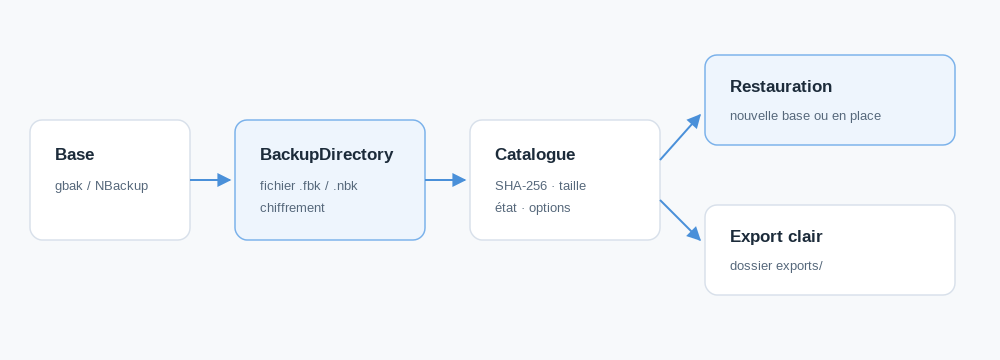
Principle
- all local backups are written under
Firebird:BackupDirectory; - the
FBEXPERT_BACKUPScatalog keeps who, when, what, where, the size and the SHA-256; - restores have their own history;
- exports are always in clear text and audited.
Directory layout
backups/
  system/
    FBEXPERT_20261123_030000.fbk
    FBEXPERT.collation-20261124_195800.fdb
  databases/
    mabase__12/
      mabase_20261123_030000.fbk
  exports/
    mabase_20261123_030000_plain.fbk
Temporary paths, /home, /root and private systemd directories are refused.
The FBEXPERT.collation-<date>.fdb copy is written at startup, just before an automatic repair of Unicode collations (gfix -icu); it is not catalogued and can be deleted once the service has been checked.
Backup
Embedded database or local backup
The path is prefilled under:
Firebird:BackupDirectory/databases/<alias>__<id>/The file is written by the local gbak, then encrypted if Backup:Encrypt=true. An OK entry is added to the catalog.
Remote database
Without the Run locally option, gbak runs on the Firebird server and writes the file on that server. The local catalog is not updated; the audit records the operation.
An SFTP profile can download the file into sftp-downloads, then catalog it locally.
Catalog
The catalog contains:
- source database;
- path;
- type
GBAKorNBACKUP; - scope
DATABASEorSYSTEM; - location
LOCALorREMOTE; - file status;
- user;
- size and SHA-256;
- encryption;
- options;
- date and duration.
Restore
An entry can be restored:
- to a new path;
- in place, by checking
Replace the existing database.
DANGER
A restore in place overwrites the target database. Back up the target and check the path before confirming.
Configuration
{
  "Firebird": {
    "BackupDirectory": "/var/lib/fbexpert/backups",
    "BackupEnabled": true,
    "BackupIntervalHours": 24,
    "BackupKeep": 14,
    "VerifyAfterBackup": true
  },
  "Backup": {
    "Encrypt": true,
    "KeepPerDatabase": 14,
    "NotifyTo": ""
  }
}
Verification
After a backup:
- check the
OKstatus in the catalog; - check the size and the SHA-256;
- test a restore on a staging database;
- keep the backup off the production server.