
Firebird kits
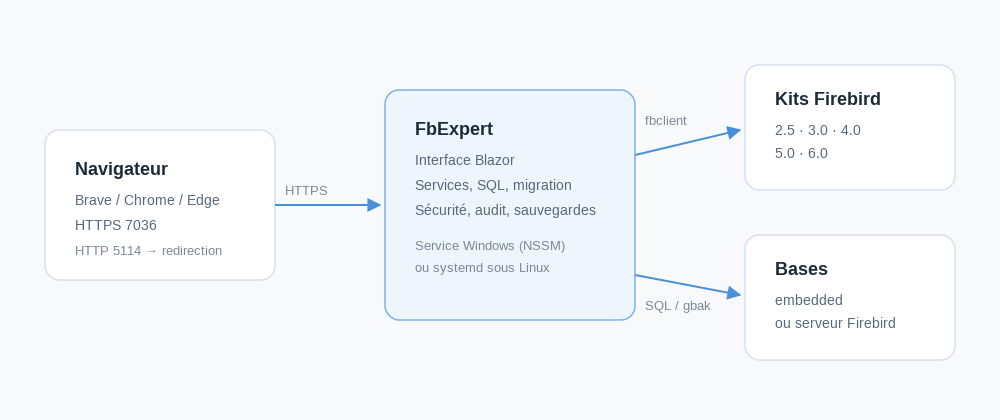
FbExpert ships its own engine for the system database and opens each user database with the kit that matches its version. A kit is a complete Firebird tree (firebird.conf, plugins/, intl/, gbak, isql, gfix…), flattened at the root of its folder.
Location
/var/lib/fbexpert/engines/<version>/The root comes from Firebird:KitsRoot in /opt/fbexpert/appsettings.json, written by the installer:
"Firebird": {
  "KitsRoot": "/var/lib/fbexpert/engines"
}
Since 7.382, all kit resolution uses this key: embedded connections, services, imports, UDR, transformations, backups.
Versions
| Kit | ODS | Extracted size | Note |
|---|---|---|---|
| 2.5 | 10.x / 11.x | ~10 MB | end of life |
| 3.0 | 12.0 | ~24 MB | end of life |
| 4.0 | 13.0 | ~48 MB | useful to demonstrate a migration |
| 5.0 | 13.1 | ~70 MB | mandatory (system database and runtime) |
| 6.0 | 14.0 | ~111 MB | pre-release, --allow-prerelease |
A database can only be opened by the kit matching its ODS. "Firebird engine kit X not found" means the database is of that version and the kit is missing or cannot be read by fbexpert.
Installation
Always go through the wrapper, as root; it runs the download under the service account:
sudo bash /opt/fbexpert/tools/install-kits-linux.sh -k 4.0
sudo bash /opt/fbexpert/tools/install-kits-linux.sh -k 2.5,3.0,4.0
sudo bash /opt/fbexpert/tools/install-kits-linux.sh -k 5.0 --force
sudo bash /opt/fbexpert/tools/install-kits-linux.sh -k 6.0 --allow-prerelease
--force replaces an existing kit, --no-udf skips FreeAdhocUDF. The main installer accepts the same list:
sudo bash /opt/fbexpert/tools/install-fbexpert-linux.sh \
  --archive /root/FbExpert-<version>-linux-x64.7z \
  --kits 2.5,3.0,4.0,5.0 --upgrade
Never run fetch-kits.sh as root
The files would be owned by root and the service would no longer be able to replace them. The wrapper takes care of this.
The security database (security5.fdb, security6.fdb…) is initialized for all installed kits. Without it, a remote connection or a read of SEC$USERS returns Install incomplete. To complete security database initialization please CREATE USER.
Verification
sudo -u fbexpert ls -1 /var/lib/fbexpert/engines
sudo -u fbexpert cat /var/lib/fbexpert/engines/4.0/kit.json
sudo -u fbexpert ls -l /var/lib/fbexpert/engines/4.0/libfbclient.so
Expected: one folder per version, libfbclient.so at the root (libfbembed.so for 2.5), plugins/libEngine12.so (3.0/4.0), libEngine13.so (5.0) or libEngine14.so (6.0), and a kit.json with version, tag, asset and checksum.
No restart is required: the kit is resolved when a database is opened or a service is started.
Troubleshooting
| Symptom | Cause | Fix |
|---|---|---|
Permission non accordée on engines/<v>/… | kit created by root | chown -R fbexpert:fbexpert /var/lib/fbexpert/engines, then run again with the wrapper |
No space left / fallocate failed | disk or quota full | df -h /var/lib/fbexpert |
Aucun asset tar.gz Linux x64 | asset unavailable or API rate-limited | check the network, try again |
| database unreadable despite the kit | wrong version | gstat -h db.fdb (ODS), then install the matching kit |
gbak: libfbclient.so.2 not found | tool launched outside FbExpert | FbExpert 7.403+ sets LD_LIBRARY_PATH; manually: LD_LIBRARY_PATH=<kit> <kit>/gbak … |
Install incomplete… | empty security database | fetch-kits.sh --force (7.408+) or CREATE USER SYSDBA PASSWORD 'masterkey' USING PLUGIN Srp; |
Unable to complete network request to host "localhost" during analysis or in the workshop | child process without a kit (engine plugin not loaded) | 7.473+ passes KitsRoot, FIREBIRD and LD_LIBRARY_PATH; otherwise reinstall the kit (fetch-kits.sh --force -k <v>) |
| same errors for every tool | patchelf missing at build time | dnf install patchelf, then fetch-kits.sh --force |
Replacing a kit: ICU collations
A database records its Unicode collations with the ICU of the engine that created it. After replacing a kit, restoring a database from another machine or moving from 5.0 to 6.0, the first write fails with COLLATION UNICODE …. Realign it with the service stopped:
K=/var/lib/fbexpert/engines/5.0
DB=/var/lib/fbexpert/data/FBEXPERT.FB5

sudo systemctl stop fbexpert
sudo cp -a "$DB" /root/FBEXPERT.FB5.bak
sudo -u fbexpert env FIREBIRD="$K" LD_LIBRARY_PATH="$K" \
  "$K/gfix" -icu "$DB" -user SYSDBA -password masterkey
sudo systemctl start fbexpert
For the system database, use the runtime actually loaded (/var/lib/fbexpert/data/runtime/firebird/5.0); for a user database, the kit matching its ODS.
Since 7.472, FbExpert performs this check at startup: a probe write (a Unicode table created then dropped) detects the mismatch before the first application write, then runs gfix -icu automatically with the runtime, after copying the database to data/backups/system as FBEXPERT.collation-<date>.fdb. The log shows the ICU version recorded in the database. If the repair fails, the service starts in degraded mode with FBX-START-203 and the command to run. Can be disabled with Firebird:AutoRepairCollations=false.
Kits and demonstration
For a demo: keep 5.0 (mandatory) and optionally 4.0 to demonstrate a migration. Kits 2.5/3.0 are end-of-life engines; 6.0 is a pre-release. On a demonstration database, also lock the engine (gfix -mode read_only).