
Firebird services
The Services console gathers Firebird administration operations: validation, backup, restore, configuration, log reading and server trace.
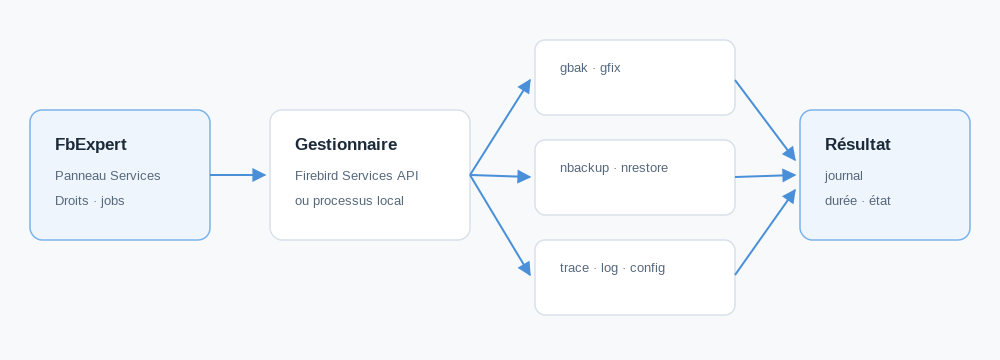
Opening the console
The Services button in the top bar opens the right-hand panel. You need:
- a connected database;
- the
Service operationspermission; - a Firebird kit compatible with the database.
Service groups
Validation and maintenance
| Service | Purpose |
|---|---|
| Validate the database | gfix -v: general consistency |
| Targeted validation | included/excluded tables and indexes, lock timeout |
| Statistics | page analysis, record versions |
| Sweep | cleanup of obsolete record versions |
Backup and restore
| Service | Purpose |
|---|---|
| Logical backup | gbak to a server or local file |
| Logical restore | gbak -c to a new database |
| NBackup backup | incremental physical backup |
| NBackup restore | physical restore |
| NBackup repair | recovery after an interrupted restore |
WARNING
NBackup restore and repair are reserved for administrators. A restore in place replaces the target database.
Database configuration
- sweep;
- page buffers;
- forced writes;
- reserved space;
- access mode;
- SQL dialect;
- shutdown and bringing the database back online.
Server
- server properties;
- attached databases;
- memory and locks;
firebird.log;- trace sessions.
Operation tracking
Each operation creates a job with:
- status: ready, running, cancelling, completed, failed, cancelled;
- progress;
- detailed log;
- duration;
- the ability to cancel long-running operations.
Jobs remain visible in the Services panel and in the history.
Best practices
- run a validation before a migration;
- back up before a destructive operation;
- check disk space before a backup;
- use a local kit only if the file is accessible on the FbExpert machine.