
Migration workshop
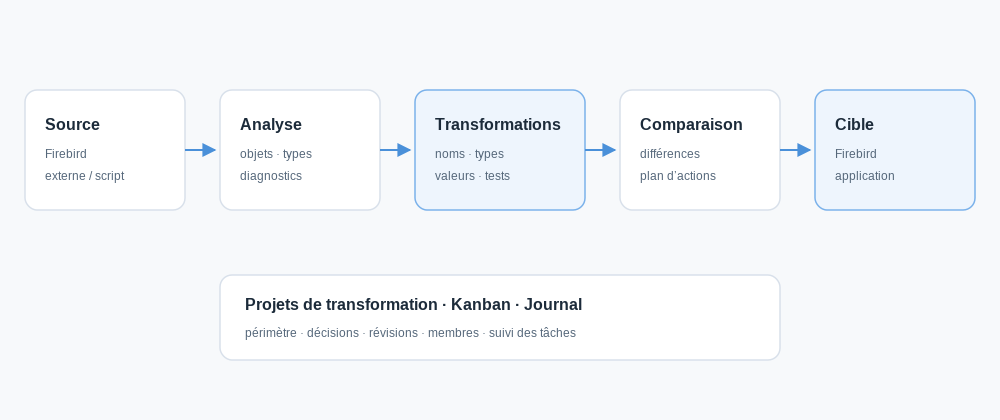
The migration workshop is used to prepare, test and apply a transfer of structure and data between a source and a target Firebird database.
Entry point
The Tools > Workshop menu opens the workshop. Secondary entry points remain available:
Tools > Transformation projects;Tools > Database comparer;Tools > Kanban;- the header of the Migration page.
Step 1 — Source
A source can be:
- a Firebird database;
- an external source that is already registered;
- a script or a dump, depending on the mode used.
The analysis collects:
- tables and views;
- columns and types;
- keys and indexes;
- dependencies;
- compatibility diagnostics.
Step 2 — Transformations
Transformations let you:
- rename objects;
- convert types;
- clean values;
- apply SQL functions;
- test an expression against real data.
The templates are available in the transformations library.
Step 3 — Comparison
The database comparer checks:
- objects;
- columns;
- types;
- keys;
- indexes;
- data, when requested.
It produces a plan of differences and lets you choose which actions to apply.
Step 4 — Projects and Kanban
A transformation project gathers:
- the scope;
- the decisions;
- the revisions;
- the members;
- the tasks and their progress.
The Kanban board shows the tasks by status and lets you track progress.
Step 5 — Apply
Before applying:
- re-read the plan;
- check the dependencies;
- review the diagnostics;
- run a dry run if one is available.
During the apply:
- the steps are logged;
- errors are kept;
- the result can be exported.
WARNING
A migration writes to the target database. Back up the target and test on a copy before any production run.
Exporting or importing a workshop
The Projects page offers Export and Import a workshop:
- the export produces a ZIP archive of the complete folder:
work.fb6,history.fb6,.sql.dump, contract, target database and SQLite data file if present; - the archive can stay unencrypted or be encrypted with a password (AES-256 + HMAC, readable on another installation);
- a
manifest.jsonlists the role, size and SHA-256 of each file; everything is verified before delivery and before extraction; - on import, choose new project or update an existing project; the folder and target database are backed up before replacement;
- close the workshop before exporting: an embedded database must not be copied while open;
- the import checks the ODS of
work.fb6and that the matching Firebird kit is installed.
UDR
UDR routines are available from Tools > UDR modules. They let you declare and test external functions before using them in transformations.