---
description: "Overview of the FbExpert modules: exploration, SQL, migration, operations, development and security."
---

# Module overview

FbExpert brings several tools together in a single interface. This page is the general map to consult before diving into the details of a module.

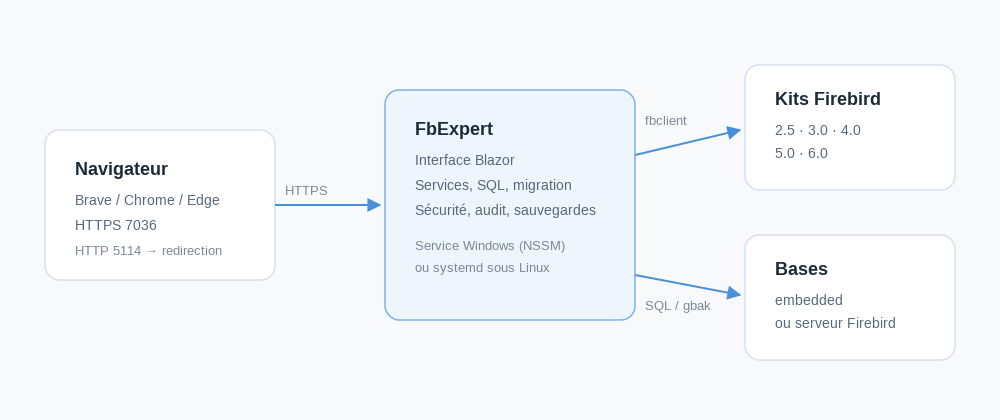
<figure>
  <img src="/images/diagrams/architecture.svg" alt="FbExpert architecture: browser, Blazor application, kits and Firebird" />
  <figcaption>The browser displays the interface; FbExpert drives the Firebird kits and the registered databases.</figcaption>
</figure>

## Main areas

<div class="fb-card-grid">
  <a class="fb-card" href="/en/guide/explorateur">
    <strong>Schema explorer</strong>
    <span>Database registry, objects, DDL, dependencies and permissions.</span>
  </a>
  <a class="fb-card" href="/en/guide/sql">
    <strong>SQL editor</strong>
    <span>Queries, scripts, plans, statistics and history.</span>
  </a>
  <a class="fb-card" href="/en/guide/snippets">
    <strong>Snippets and formatting</strong>
    <span>Version-specific SQL templates and consistent formatting.</span>
  </a>
  <a class="fb-card" href="/en/guide/services">
    <strong>Firebird services</strong>
    <span>Validation, backup, restore, configuration and trace.</span>
  </a>
  <a class="fb-card" href="/en/guide/sauvegardes">
    <strong>Backups</strong>
    <span>gbak, NBackup, catalog, encryption and restore.</span>
  </a>
  <a class="fb-card" href="/en/guide/import-export">
    <strong>Import, export and ETL</strong>
    <span>DDL, data, profiles, contracts and diagnostics.</span>
  </a>
  <a class="fb-card" href="/en/guide/comparateur">
    <strong>Database comparer</strong>
    <span>Structural and data differences, plus an action plan.</span>
  </a>
  <a class="fb-card" href="/en/guide/transformations">
    <strong>Transformations</strong>
    <span>Before/Body/After rules, wizard and library.</span>
  </a>
  <a class="fb-card" href="/en/guide/projets">
    <strong>Projects and Kanban</strong>
    <span>Revisions, decisions, members and task tracking.</span>
  </a>
  <a class="fb-card" href="/en/guide/udr">
    <strong>UDR</strong>
    <span>Native modules, declarations, SQL and tests.</span>
  </a>
  <a class="fb-card" href="/en/guide/migration">
    <strong>Migration workshop</strong>
    <span>External sources, transformations, comparison and apply.</span>
  </a>
  <a class="fb-card" href="/en/guide/analyse-import">
    <strong>From analysis to import</strong>
    <span>Full path, checks and troubleshooting.</span>
  </a>
  <a class="fb-card" href="/en/guide/securite">
    <strong>Security and access</strong>
    <span>Users, groups, profiles, OTP, audit and alerts.</span>
  </a>
</div>

## Documented modules

- [Windows and Linux installation](/en/guide/installation)
- [Schema explorer](/en/guide/explorateur)
- [SQL editor](/en/guide/sql)
- [Snippets and formatting](/en/guide/snippets)
- [Firebird services](/en/guide/services)
- [Backups](/en/guide/sauvegardes)
- [Import, export and ETL](/en/guide/import-export)
- [Database comparer](/en/guide/comparateur)
- [Transformations](/en/guide/transformations)
- [Projects and Kanban](/en/guide/projets)
- [UDR](/en/guide/udr)
- [History and transfers](/en/guide/historique-transferts)
- [Security and access](/en/guide/securite)

## Reference

- [T-SQL compatibility](/en/guide/compatibilite-tsql) — functions, types, views and what is not covered.
- [Firebird kits](/en/guide/kits-firebird) — versions, installation, troubleshooting.
- [System schema](/en/guide/schema-systeme) — system database, migrations, pre-migration backup.
- [Known limitations](/en/guide/limites) — embedded engine, UDR, sources, demonstration.
- [Release notes](/en/guide/journal) — milestones and recent versions.

## Resources

- [Online demo](https://demo.fbexpert.tetrasys.be/) — public read-only instance.
- [Release notes](https://fbexpert.tetrasys.be/) — complete guide and history of changes.
- [Documentation for AI](/en/guide/ia) — `llms.txt`, full text and per-page Markdown.

::: tip Navigation
The left-hand menu follows the recommended order. The `Previous` and `Next` links at the bottom of each page let you read through the guide in sequence.
:::